
Facilitate staff-to-store communication by managing shift/leave requests and operational announcements.
The Employee App is the smartphone application for “Gulf CSM Time and Attendance Management,” which incorporates the expertise and know-how of over 30,000 chain stores. Since staff can easily submit shift and leave requests and view estimated salary data on their smartphones, it ensures smooth communication between staff and the stores.
Image of using the employee app

Benefits for users
About Functions
The Employee App is a smartphone application that integrates with Gulf CSM.
It is an optional feature that allows staff to check their own shift schedule, check shift openings from managers, submit their own shift requests, and more.
It also closely integrates with the predictive shift function, allowing the store to recruit for shifts that could not be optimized, reflect staff availability in the optimization engine’s rules, and thereby create shift schedules more efficiently.
It closely integrates with the predictive shift function, allowing for recruitment of shifts that could not be optimized, and
reflecting staff circumstances in the optimization engine’s rules, enabling more efficient shift scheduling.
① Calendar
Displays the status of confirmed shifts and requested shifts using icons.
Tapping on a date allows you to check the shift details and
work records.
- Confirmed shifts or records. Workdays
- Confirmed shifts or records. Holidays
- Requested shifts. Workdays
- Requested shifts. Holidays)
② Attendance Registration Button
Buttons for clocking in/out and breaks. Records location information at the time of clocking.
③ Today’s Schedule
Displays today’s work and holiday schedule.
④ Current Month’s Work Status
Displays the estimated salary amount based on the current month’s work records and shift hours. The target earnings can be set freely.
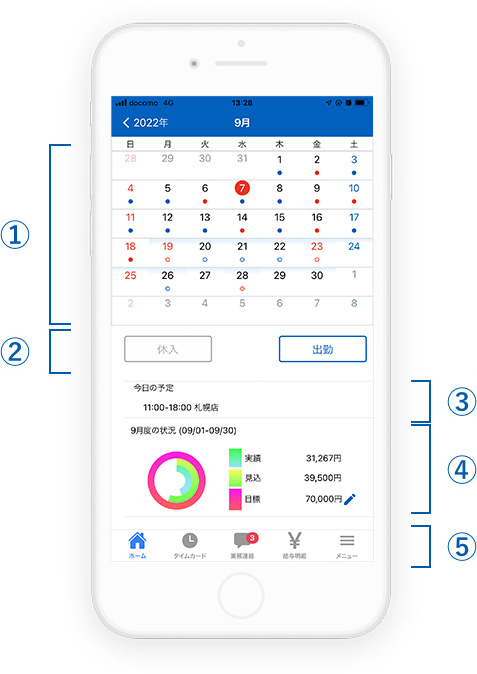
① Calendar
Displays the status of confirmed shifts and requested shifts using icons.
Tapping on a date allows you to check the shift details and
work records.
- Confirmed shifts or records. Workdays
- Confirmed shifts or records. Holidays
- Requested shifts. Workdays
- Requested shifts. Holidays
② Attendance Registration Button
Buttons for clocking in/out and breaks. Records location information at the time of clocking.
③ Today’s Schedule
Displays today’s work and holiday schedule.
④ Current Month’s Work Status
Displays the estimated salary amount based on the current month’s work records and shift hours. The target earnings can be set freely.
Function Details
Shift Request
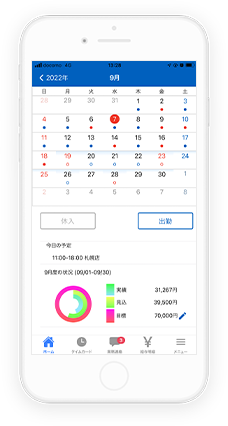
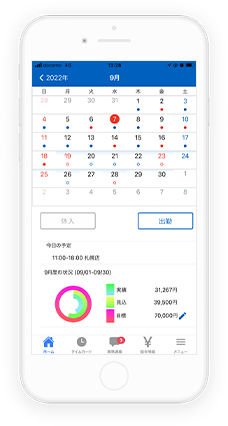
On the calendar displayed on the home screen, staff can submit requests for workdays and holidays according to their personal circumstances. It’s easy to operate as you just have to tap the date. You can also set the start and end times for the desired workday.
Tap the date on the displayed calendar for the day you want to request a desired shift or holiday
If there are additional requests
If there are additional requests for shifts, you can confirm and apply for shift requests from the recruitment screen.
Shift Recruitment Icon
If there are notifications for recruitment or shift changes, an unread icon will appear on the business communication icon at the bottom. A diagram explaining the shift recruitment list icon in case of additional requests.
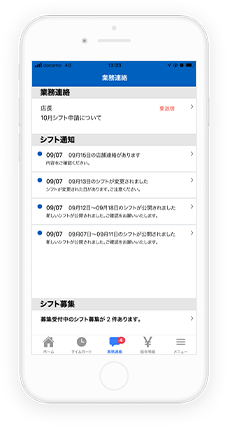
Shift Recruitment List
Tapping the shift recruitment icon will take you to the list screen tab. A diagram explaining the details of shift recruitment in case of additional requests.
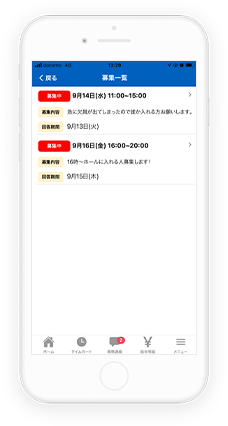
Shift Recruitment Details
Tapping on the items currently recruiting will display the details screen, allowing you to apply.
※The shift recruitment screen is under development and may differ from the actual specifications.
Confirmed Shift Confirmation
The store manager creates shifts based on requests from staff. Once the shifts are confirmed, they are reflected on the calendar. Confirmed work days and holidays are displayed as icons below the dates, making it easy to understand the schedule.
When confirmed shifts are published, icons for the shift setting dates will appear on the calendar.
Tapping on the date of the confirmed shift will display details of work hours and locations.
Notice Confirmation
If there is a message from the store manager, an icon will be displayed on the “Business Message” icon in the bottom menu.
There are three types of messages: “Business Message,” “Shift Job Openings,” and “Shift Notifications,” and the display will change depending on the type of message.
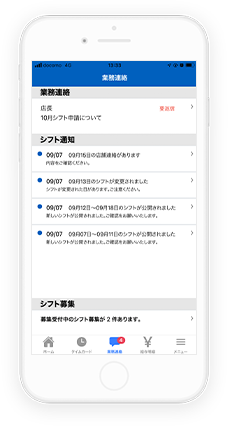
Business Communication
In addition to urgent communications from the store, maintenance information for the employee app is displayed. A diagram showing the shifts currently recruiting and application results.
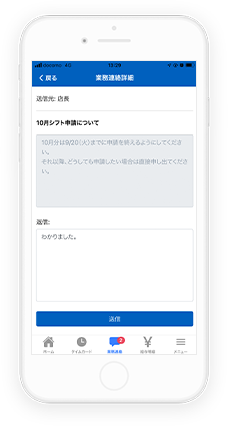
Shift Recruitment
In addition to shifts currently recruiting, your application status and results are displayed. A diagram explaining that notifications will be displayed when shifts are published or changed.
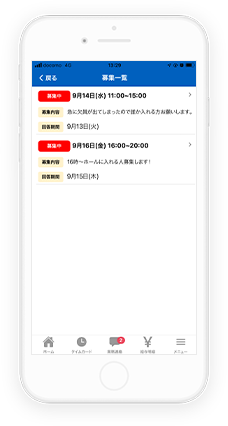
Shift Notifications
Notifications will be displayed when shifts are published or changed, or when there is a response to a change request.
Various Requests
You can submit workflows for requests such as paid leave and overtime.
You will receive notifications in the app when workflows are approved or rejected.
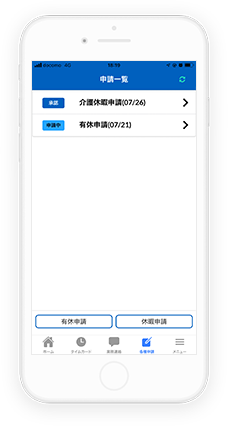
Request List
You can check the status of workflows that are currently being requested. A diagram explaining that you can submit new workflows from the app.
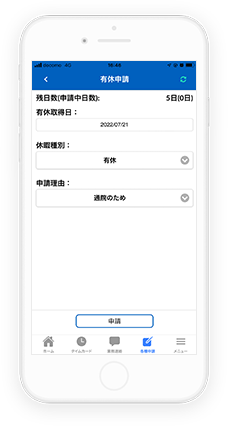
Request
You can submit new workflows from the app. A diagram explaining that you can check the approval status and comments of workflows that are currently being requested.
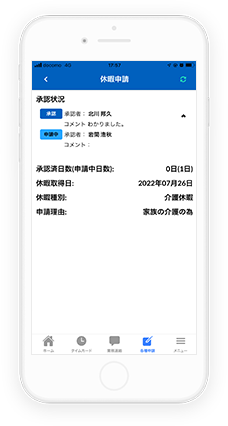
Status Check
You can check the approval status and comments of workflows that are currently being requested.
Examples of Operations Using the App
Case
Using the employee app allows for smoother communication with staff involved in shift creation.
Before creating shifts, you can collect shift requests and holiday requests from staff, allowing for shift creation that takes these into account.
The predictive shift optimization engine can suggest shift creation that considers staff requests.
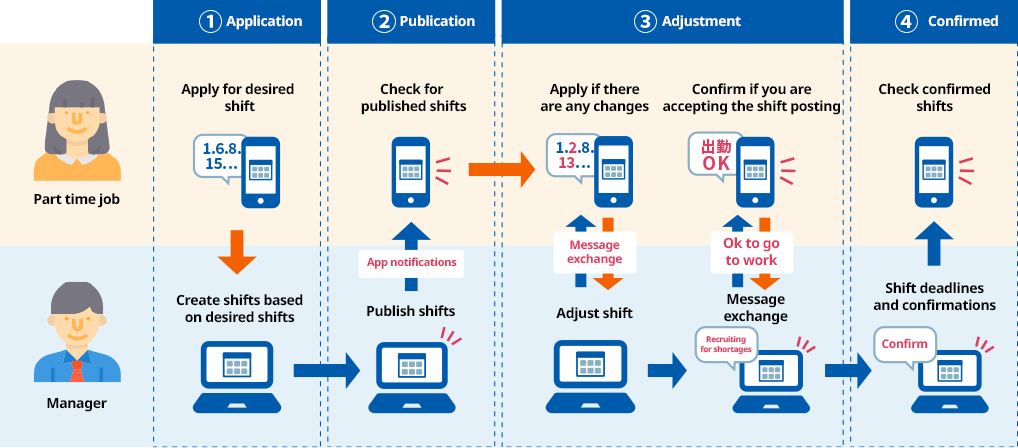
Once shifts are created, you can publish them to staff, accept change requests, and recruit for shifts that are still unassigned.
Staff communication features enable rapid and smooth shift adjustments
Notifications will be sent to the app for any publications, recruitments, or changes to shifts, preventing staff from missing important updates.
About Implementation
Introduction
If you are using Gulf CSM Time and Attendance Management, you can start easily and without hassle.
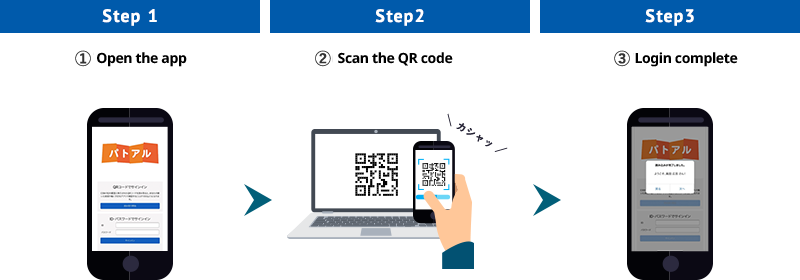
First-time sign-in is simple: just open the app and scan the QR code displayed on your Gulf CSM Time and Attendance management screen.
This step is not required for subsequent logins.
And if you use it with predictive shifts, you’ll get even more efficiency!
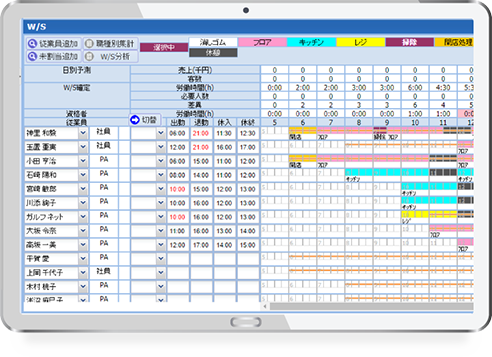
The Gulf CSM Time and Attendance predictive shift feature is an optional function that integrates with Gulf CSM, where an optimization engine supports store managers in creating shifts.
It also closely integrates with the Employee App to collect staff’s work and leave requests in advance.
Because it proposes the optimal personnel assignment after considering various conditions related to the shift, the burden of shift creation can be significantly reduced.

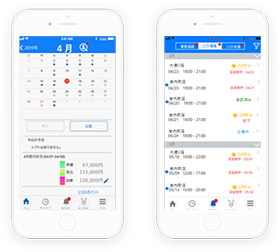
By providing shifts that align with the desire to work and by granting employee incentive points, we simultaneously achieve optimal staffing and an increase in productivity!
Please consider the Gulf CSM Time and Attendance Management Employee App.
★To use this service,the introduction of Gulf CSM Time and Attendance Management is required.
Support for flexible work arrangements, improving productivity, and reducing labor risks
Gulf CSM Time and Attendance Management System
Using biometric authentication for attendance clocking and various alert notifications reduces labor risks.
By complying with regulations and improving productivity, it strengthens corporate risk management.