
Support for Flexible Work Arrangements with Time and Attendance Management System

To prevent impersonation during attendance clock-in, there is a function to enter a password for each individual at the time of clock-in. However, managing and changing complex passwords is a burden not only for system administrators but also for employees. GulfNet’s attendance system has implemented attendance clock-in using facial recognition instead of password input, enhancing convenience while utilizing traditional security features.
Do you have these concerns?
Facial recognition is a beneficial system for both administrators and employees.
Administrator’s Concerns

Although time cards are introduced, there is fraudulent clock-in such as impersonation and proxy clock-in.

We lack a system for managing attendance records for employees working remotely (e.g., at home, coworking spaces, or satellite offices) or those who visit clients on-site.

For businesses that frequently open and close temporary offices, it is impractical and cumbersome to deploy and manage physical clock-in devices.

Deploying physical clock-in machines across numerous national branches, especially those with only a few employees, is cost-prohibitive.

We need a centralized system to aggregate labor hours and streamline payroll calculations from all our diverse branches and locations.

There is no space to place dedicated clock-in machines or authentication devices.
Employee’s Concerns

Due to overlapping attendance times, there are times when I cannot clock-in on time when I reach the office due to waiting in a long queue.

I was unable to clock-in because I forgot or lost my IC card.

I have to submit attendance applications for unrecorded attendance after frequent business trips, which is cumbersome.
Easy to Introduce!
Gulf CSM Time and Attendance Management System’s facial recognition can be used with just a web browser and a camera. It can be easily introduced regardless of location.
How to Use
Step 1
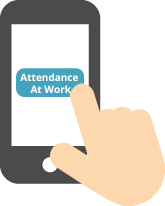
Click the Attendance Button
Step 2
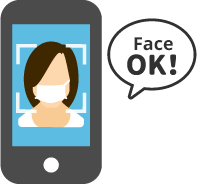
The camera will start and the authentication engine will
automatically detect the face and authenticate
Step 3

Clock-in Completed
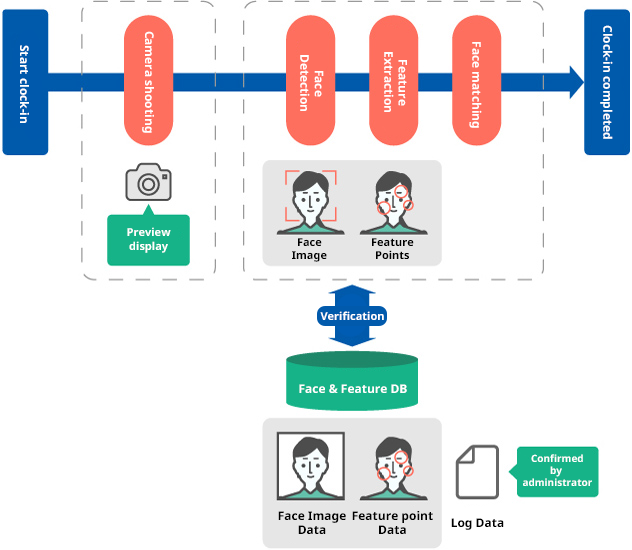
Flow of Facial Recognition Clock-in
Features
- No dedicated terminal is required; it can be used with a tablet or PC with a camera.
- Facial recognition processes clock-in without the need for ID input or employee name selection, allowing for quick clock-in.
- As it is biometric authentication, there is no need for cumbersome tasks such as password management or card issuance/loss.
- The stamped images can be checked later with the log reference function.
- All data is managed at the data center. Authentication can be done even when working at other locations.
- It can determine the presence or absence of a mask, allowing for authentication even when wearing a mask.
Benefits of Introduction
Benefits for Administrators

It can prevent fraudulent clock-in such as impersonation and proxy clock-in.

It can reduce management and operational costs associated with the loss or theft of IC cards.

By properly managing employees’ working hours, it reduces the company’s labor risks.

It enhances security during entry and exit.

It can visualize service overtime hours within the facility (reducing labor risks and violations of labor standards).
Benefits for Employees

No more IC cards means fewer belongings and improved convenience.

No more hassle of post-application for clock-in when forgetting IC cards or during business trips.

Strengthened management of overtime hours helps prevent employees from exceeding their working hours, leading to reduced burden.
Here are the differences!
GulfNet’s Facial Recognition Engine
[1] Choose a facial recognition engine that suits your usage
You can choose the facial recognition engine and payment method. You can select according to your desired authentication accuracy and cost structure.
| Authentication Engine | NEC NeoFace | Amazon Rekognition Face |
|---|---|---|
| Features | A facial recognition AI engine boasting world-class authentication accuracy. Clock-in authentication is possible on Windows PCs. | Achieves high-precision image analysis using machine learning. Clock-in authentication is possible on Windows and iOS. A pay-as-you-go plan is available based on usage. |
| PC Stamping | ○ | ○ |
| Smartphone Stamping | ✕ | ○ |
[2] Solving Attendance Business Challenges
We will propose improvement methods tailored to your operational methods and challenges. It’s not just about implementation; we will assist in improving your operations to resolve your challenges.
[3] More Convenient with System Integration
By integrating with your company’s business management system, it becomes more convenient.
Support for flexible working arrangements, productivity improvement, and labor risk reduction
Gulf CSM Time and Attendance Management System
By using biometric authentication for attendance clock-in and various alert notifications, we reduce labor risks. Compliance and productivity improvements support corporate risk management.